Playing Songs
Playing any song from mbzlists needs you to somehow resolve the musicbrainz ID to platform specific identifier.
On mbzlists
Songs and lists can be played on the mbzlists web app using third party platforms. The content resolvers needed for this to work are already running in the backend of mbzlists and you don't have to do anything manually.
Playlists
For a few platforms like YouTube, the whole list can be played directly by using the 'play' button.
For other platforms, playing a list usually involves exporting them to your account which you can do by clicking on the 'export' button.
Individual Songs
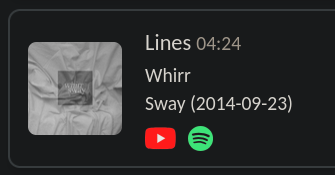
Individual songs in a list have platform icons in their cards like shown below that you can use to play the song on the respective platform.
Via the playlist file
When you have the playlist file (XSPF) with you, you need to use a content resolver to play songs on a platform. The resolver used by mbzlists web app is hosted here. To do anything beyond this, you will need to write your own resolver.
Most resolvers can safely ignore the annotations from the playlist file and just
focus on the <tracklist> element. To be truly portable, mbzlists identifies
tracks using Musicbrainz IDs. Here is how each
<track> element looks like:
<track>
<title>In Your Room</title>
<creator>Airiel</creator>
<album>Winks & Kisses: 20th Anniversary Deluxe Edition</album>
<info>https://musicbrainz.org/recording/7b54cad3-7542-4edf-8d0e-fd423c9b8166</info>
<location>https://musicbrainz.org/recording/7b54cad3-7542-4edf-8d0e-fd423c9b8166</location>
</track>
Your resolver need to loop over all the <track> elements and find equivalents
on your platform of choice.